
Designing Field Tools for Philly Truce's Peace Patrol
Designing Field Tools for Philly Truce's Peace Patrol
Designing Field Tools for Philly Truce's Peace Patrol
Philly Truce is a Philadelphia nonprofit working to reduce gun violence through community-led patrols. Their Peace Patrol Officers, many of them justice-impacted men and returning citizens, walk designated routes in neighborhoods most affected by violence. The program has piloted on SEPTA transit and is working to scale citywide.
Philly Truce is a Philadelphia nonprofit working to reduce gun violence through community-led patrols. Their Peace Patrol Officers, many of them justice-impacted men and returning citizens, walk designated routes in neighborhoods most affected by violence. The program has piloted on SEPTA transit and is working to scale citywide.
Philly Truce is a Philadelphia nonprofit working to reduce gun violence through community-led patrols. Their Peace Patrol Officers, many of them justice-impacted men and returning citizens, walk designated routes in neighborhoods most affected by violence. The program has piloted on SEPTA transit and is working to scale citywide.
Officers in the field needed two things from a mobile app: a way to document incidents quickly and accurately, and a way to coordinate who was patrolling which route and when. I joined the project through Tech Fleet as one of six designers across two phases, contributing to both the Incident Report Management Platform and the Routes system. Within Routes, I conceived and designed the filtering feature on the All Routes screen, from the original problem through final design.
Officers in the field needed two things from a mobile app: a way to document incidents quickly and accurately, and a way to coordinate who was patrolling which route and when. I joined the project through Tech Fleet as one of six designers across two phases, contributing to both the Incident Report Management Platform and the Routes system. Within Routes, I conceived and designed the filtering feature on the All Routes screen, from the original problem through final design.
Officers in the field needed two things from a mobile app: a way to document incidents quickly and accurately, and a way to coordinate who was patrolling which route and when. I joined the project through Tech Fleet as one of six designers across two phases, contributing to both the Incident Report Management Platform and the Routes system. Within Routes, I conceived and designed the filtering feature on the All Routes screen, from the original problem through final design.
Project type
Volunteer Client Project
Volunteer Client Project
Timeline
Nov 2024 – Jun 2025 (Phases 4–5)
Nov 2024 – Jun 2025 (Phases 4–5)
Role
UX Designer, one of six
UX Designer, one of six
Limitations
Multi-phase, multi-team scope
Small usability testing sample
Officer digital literacy and device access
Multi-phase, multi-team scope
Small usability testing sample
Officer digital literacy and device access
The Problem
The Problem
Peace Patrol Officers were documenting incidents on patrol, but the existing tools worked against them.
Reports were hard to identify. Every report was labeled only by number, like "Report #1839." An officer looking for a specific incident had to open reports one at a time to find it.
Patrols ran on text threads. Philly Truce told us officers were coordinating shifts through group texts and phone calls, with no structured way to see available routes, claim a shift, or check in. It was easy to lose track of who was covering what.
The app fought the field context. Officers work outdoors, under pressure, often mid-situation. Anything ambiguous, like an unlabeled filter icon or an unexplained notification dot, costs attention they can't spare.
Peace Patrol Officers were documenting incidents on patrol, but the existing tools worked against them.
Reports were hard to identify. Every report was labeled only by number, like "Report #1839." An officer looking for a specific incident had to open reports one at a time to find it.
Patrols ran on text threads. Philly Truce told us officers were coordinating shifts through group texts and phone calls, with no structured way to see available routes, claim a shift, or check in. It was easy to lose track of who was covering what.
The app fought the field context. Officers work outdoors, under pressure, often mid-situation. Anything ambiguous, like an unlabeled filter icon or an unexplained notification dot, costs attention they can't spare.
Peace Patrol Officers were documenting incidents on patrol, but the existing tools worked against them.
Reports were hard to identify. Every report was labeled only by number, like "Report #1839." An officer looking for a specific incident had to open reports one at a time to find it.
Patrols ran on text threads. Philly Truce told us officers were coordinating shifts through group texts and phone calls, with no structured way to see available routes, claim a shift, or check in. It was easy to lose track of who was covering what.
The app fought the field context. Officers work outdoors, under pressure, often mid-situation. Anything ambiguous, like an unlabeled filter icon or an unexplained notification dot, costs attention they can't spare.
Who We Were Designing For
Who We Were Designing For
The designs had to account for those who were actually using the app. Many Peace Patrol Officers are recently released from incarceration or living in halfway houses, often with limited long-term access to technology. Some patrol with older phones and unreliable service. Philly Truce also wanted officers spending as little time looking at a screen as possible while on patrol.
Every decision had to work for someone opening an app like this for the first time, on a phone that might drop connection, without slowing them down.
The designs had to account for those who were actually using the app. Many Peace Patrol Officers are recently released from incarceration or living in halfway houses, often with limited long-term access to technology. Some patrol with older phones and unreliable service. Philly Truce also wanted officers spending as little time looking at a screen as possible while on patrol.
Every decision had to work for someone opening an app like this for the first time, on a phone that might drop connection, without slowing them down.
The designs had to account for those who were actually using the app. Many Peace Patrol Officers are recently released from incarceration or living in halfway houses, often with limited long-term access to technology. Some patrol with older phones and unreliable service. Philly Truce also wanted officers spending as little time looking at a screen as possible while on patrol.
Every decision had to work for someone opening an app like this for the first time, on a phone that might drop connection, without slowing them down.
The Incident Report Management Platform
The Incident Report Management Platform
The Incident Report Management Platform
A Shift in Priority
A Shift in Priority
Early feedback from both users and project leaders highlighted the IRMP as the top priority. To address its immediate needs, we shifted our focus from the settings page and sign-up flow to improve this critical tool for community safety.
Early feedback from both users and project leaders highlighted the IRMP as the top priority. To address its immediate needs, we shifted our focus from the settings page and sign-up flow to improve this critical tool for community safety.
Early feedback from both users and project leaders highlighted the IRMP as the top priority. To address its immediate needs, we shifted our focus from the settings page and sign-up flow to improve this critical tool for community safety.


Overhauling Editing
Overhauling Editing
To address user feedback on poor report identification, we overhauled the report editing form. We replaced the generic version with a smarter interface featuring a dynamic header for context, new fields for police notifications and related incidents, and intelligent conditional fields to reduce clutter. This resulted in a cleaner, more intuitive form that also captured richer data.
To address user feedback on poor report identification, we overhauled the report editing form. We replaced the generic version with a smarter interface featuring a dynamic header for context, new fields for police notifications and related incidents, and intelligent conditional fields to reduce clutter. This resulted in a cleaner, more intuitive form that also captured richer data.
To address user feedback on poor report identification, we overhauled the report editing form. We replaced the generic version with a smarter interface featuring a dynamic header for context, new fields for police notifications and related incidents, and intelligent conditional fields to reduce clutter. This resulted in a cleaner, more intuitive form that also captured richer data.


Assigning and Resolving a Report
Assigning and Resolving a Report
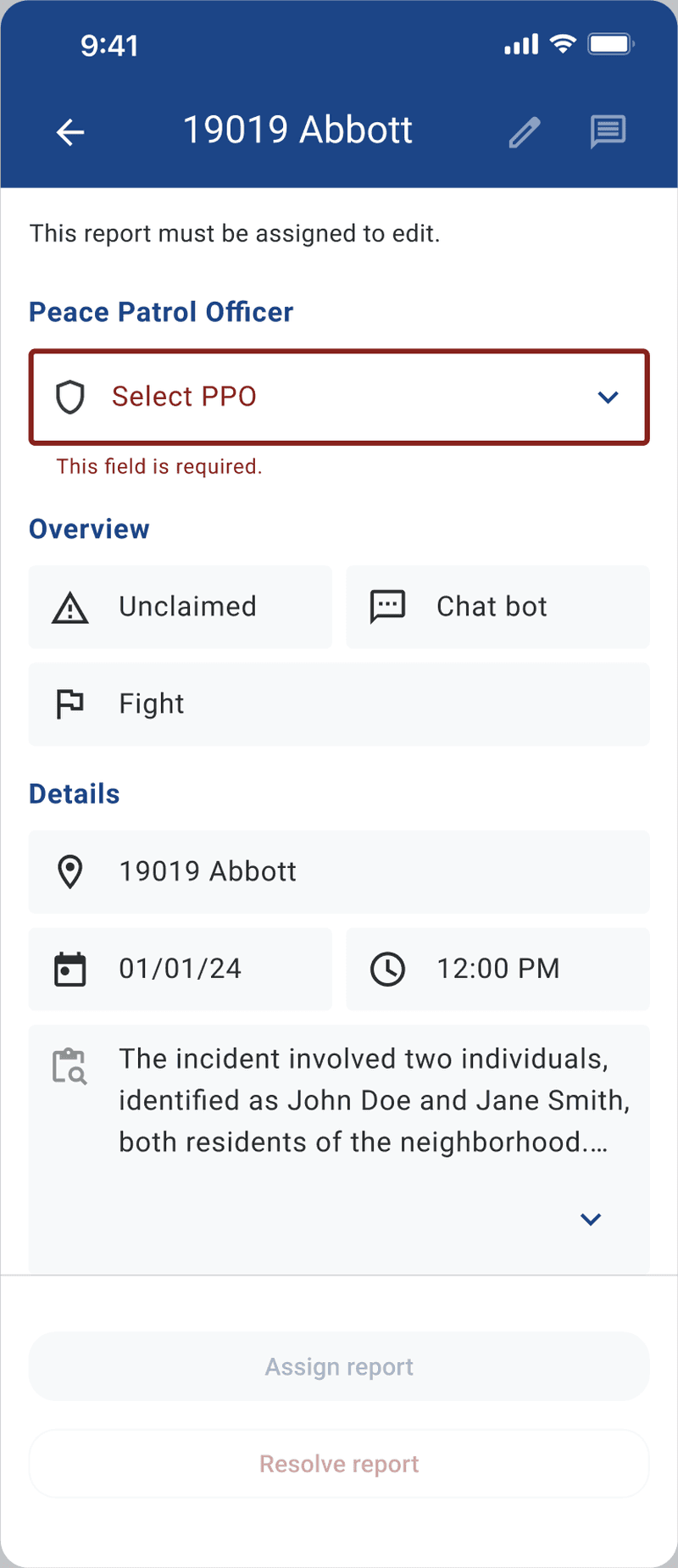
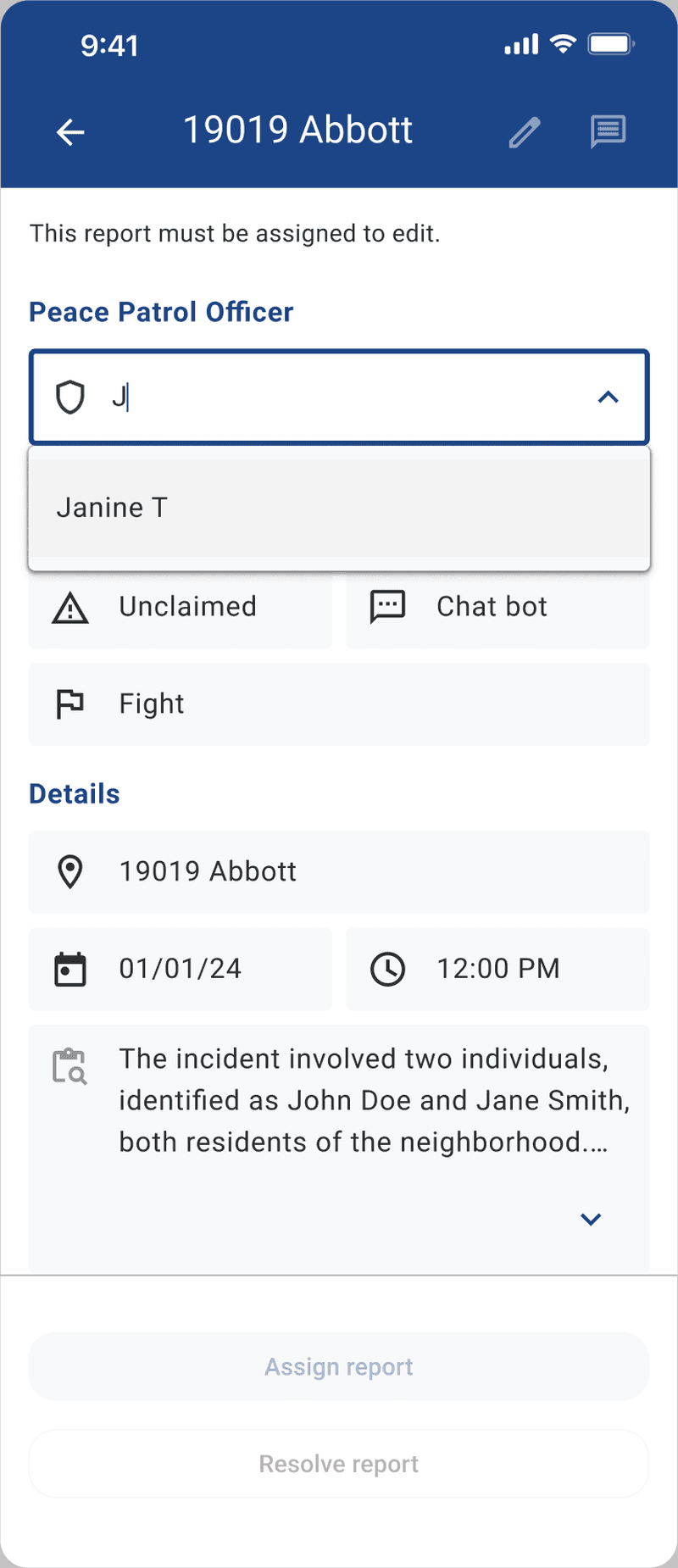
Every unclaimed report locks until it's assigned. Skip the officer field, and the form throws a validation error before you can move forward. Pick someone, and two buttons unlock: Assign report or Resolve report, each with its own plain-language confirmation before anything changes.
This gate matters because of what testing later found: officers expected to assign a report to more than one PPO, since patrols rarely work alone. The one-PPO structure here was where Phase 5 finished, not the end of the story.
Every unclaimed report locks until it's assigned. Skip the officer field, and the form throws a validation error before you can move forward. Pick someone, and two buttons unlock: Assign report or Resolve report, each with its own plain-language confirmation before anything changes.
This gate matters because of what testing later found: officers expected to assign a report to more than one PPO, since patrols rarely work alone. The one-PPO structure here was where Phase 5 finished, not the end of the story.
Every unclaimed report locks until it's assigned. Skip the officer field, and the form throws a validation error before you can move forward. Pick someone, and two buttons unlock: Assign report or Resolve report, each with its own plain-language confirmation before anything changes.
This gate matters because of what testing later found: officers expected to assign a report to more than one PPO, since patrols rarely work alone. The one-PPO structure here was where Phase 5 finished, not the end of the story.




IRMP Testing Results
IRMP Testing Results
3
participants tested core IRMP tasks — two Peace Patrollers, one Assistant Program Manager
participants tested core IRMP tasks — two Peace Patrollers, one Assistant Program Manager
participants tested core IRMP tasks — two Peace Patrollers, one Assistant Program Manager
What worked
What worked
Everyone found and understood the report they were looking for
Everyone found and understood the report they were looking for
Everyone completed the new report-assignment flow without help
Everyone completed the new report-assignment flow without help
What didn't
What didn't
Report overviews lacked context, especially threat severity
Report overviews lacked context, especially threat severity
"PPD" was misread as Peace Patrol Director, not Philadelphia Police Department
"PPD" was misread as Peace Patrol Director, not Philadelphia Police Department
Officers expected to assign a report to more than one PPO — "it's never just one"
Officers expected to assign a report to more than one PPO — "it's never just one"
"Fight" read as more severe than intended
"Fight" read as more severe than intended
The filter icon wasn't recognized without help
The filter icon wasn't recognized without help
These shaped the next-phase recommendations: spell out acronyms, add severity indicators, support multi-PPO assignment, replace the icon-only filter with a labeled one.
These shaped the next-phase recommendations: spell out acronyms, add severity indicators, support multi-PPO assignment, replace the icon-only filter with a labeled one.
These shaped the next-phase recommendations: spell out acronyms, add severity indicators, support multi-PPO assignment, replace the icon-only filter with a labeled one.
The Routes Management System
The Routes Management System
The Routes Management System
Browsing and Claiming a Route
Browsing and Claiming a Route
A shift starts on the All Routes screen. Location, date, and time show without opening anything, and routes only appear one to two weeks out, keeping the list relevant instead of cluttered with dates too far ahead.
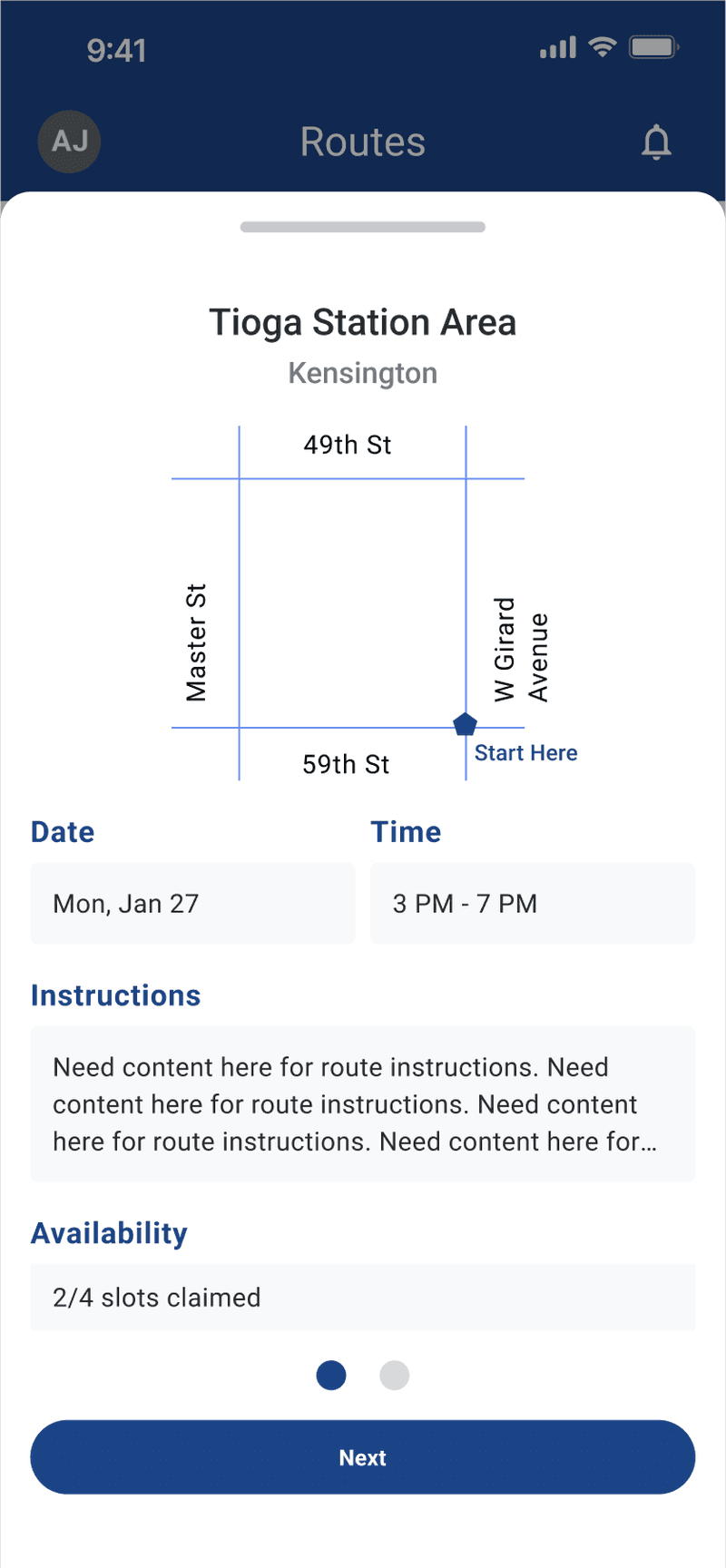
Tapping in shows the full picture: map, time, instructions, slots claimed. From there, an officer picks a role, home base or on route, before Claim route activates, same disabled-until-complete pattern as the filter. That split wasn't a given; it settled here after being an open question earlier in the project.
Claiming ends with one confirmation naming the exact shift, not a generic yes/no.
A shift starts on the All Routes screen. Location, date, and time show without opening anything, and routes only appear one to two weeks out, keeping the list relevant instead of cluttered with dates too far ahead.
Tapping in shows the full picture: map, time, instructions, slots claimed. From there, an officer picks a role, home base or on route, before Claim route activates, same disabled-until-complete pattern as the filter. That split wasn't a given; it settled here after being an open question earlier in the project.
Claiming ends with one confirmation naming the exact shift, not a generic yes/no.
A shift starts on the All Routes screen. Location, date, and time show without opening anything, and routes only appear one to two weeks out, keeping the list relevant instead of cluttered with dates too far ahead.
Tapping in shows the full picture: map, time, instructions, slots claimed. From there, an officer picks a role, home base or on route, before Claim route activates, same disabled-until-complete pattern as the filter. That split wasn't a given; it settled here after being an open question earlier in the project.
Claiming ends with one confirmation naming the exact shift, not a generic yes/no.


Managing a Claimed Route
Managing a Claimed Route
My Routes shows every claimed shift, split by upcoming and past. Cancelling asks once, naming the exact shift, then a snackbar with Undo catches any second thoughts.
There's a real limit: shifts can be unclaimed up to one hour before start time, surfaced right on the card via an info icon instead of buried in a help page. Philly Truce needs that notice to fill an open slot.
My Routes shows every claimed shift, split by upcoming and past. Cancelling asks once, naming the exact shift, then a snackbar with Undo catches any second thoughts.
There's a real limit: shifts can be unclaimed up to one hour before start time, surfaced right on the card via an info icon instead of buried in a help page. Philly Truce needs that notice to fill an open slot.
My Routes shows every claimed shift, split by upcoming and past. Cancelling asks once, naming the exact shift, then a snackbar with Undo catches any second thoughts.
There's a real limit: shifts can be unclaimed up to one hour before start time, surfaced right on the card via an info icon instead of buried in a help page. Philly Truce needs that notice to fill an open slot.


Designing the All Routes Filter
Designing the All Routes Filter
Filtering wasn't in scope, I pushed for and created it once the All Routes list grew too long to scan, with no way to narrow by distance, time, or neighborhood. The filter covers four criteria: a distance slider, a shift-time toggle, an availability checkbox, and a neighborhood multi-select, and the "Show results" button stays disabled until at least one is applied, then shows a live count. An earlier filter existed for IRMP as a modal, but I rebuilt Routes' as a dedicated screen instead, closer to how officers already scanned lists elsewhere. It shipped in the Phase 5 file untested, so the natural next step is putting it in front of real Peace Patrollers.
Filtering wasn't in scope, I pushed for and created it once the All Routes list grew too long to scan, with no way to narrow by distance, time, or neighborhood. The filter covers four criteria: a distance slider, a shift-time toggle, an availability checkbox, and a neighborhood multi-select, and the "Show results" button stays disabled until at least one is applied, then shows a live count. An earlier filter existed for IRMP as a modal, but I rebuilt Routes' as a dedicated screen instead, closer to how officers already scanned lists elsewhere. It shipped in the Phase 5 file untested, so the natural next step is putting it in front of real Peace Patrollers.
Filtering wasn't in scope, I pushed for and created it once the All Routes list grew too long to scan, with no way to narrow by distance, time, or neighborhood. The filter covers four criteria: a distance slider, a shift-time toggle, an availability checkbox, and a neighborhood multi-select, and the "Show results" button stays disabled until at least one is applied, then shows a live count. An earlier filter existed for IRMP as a modal, but I rebuilt Routes' as a dedicated screen instead, closer to how officers already scanned lists elsewhere. It shipped in the Phase 5 file untested, so the natural next step is putting it in front of real Peace Patrollers.


Starting and Running a Patrol
Starting and Running a Patrol
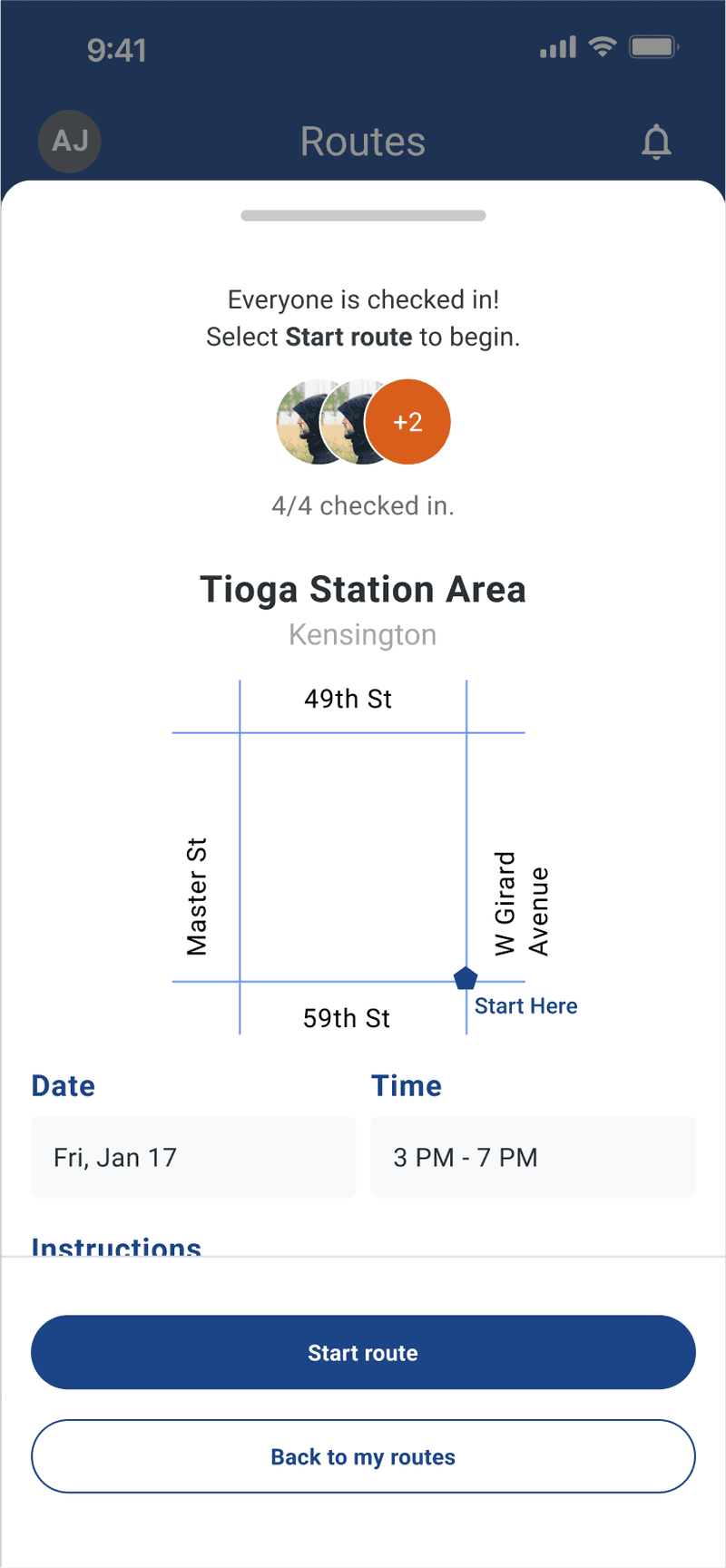
Every assigned officer must check in before a shift starts, no exceptions. "Everyone is checked in! Select Start route to begin," confirms with a count and faces. If someone's missing, the route doesn't start.
The active patrol screen shows who's on duty, their role, and a live countdown. Ending takes a deliberate swipe, not a tap. Taking a break flips the countdown from green "On Shift" to orange "On Break," both visible right on the My Routes list without opening the detail screen.
The route summary ties it together: a timestamped timeline, location, and every report filed during that patrol, the one screen where Routes and IRMP meet.
Every assigned officer must check in before a shift starts, no exceptions. "Everyone is checked in! Select Start route to begin," confirms with a count and faces. If someone's missing, the route doesn't start.
The active patrol screen shows who's on duty, their role, and a live countdown. Ending takes a deliberate swipe, not a tap. Taking a break flips the countdown from green "On Shift" to orange "On Break," both visible right on the My Routes list without opening the detail screen.
The route summary ties it together: a timestamped timeline, location, and every report filed during that patrol, the one screen where Routes and IRMP meet.
Every assigned officer must check in before a shift starts, no exceptions. "Everyone is checked in! Select Start route to begin," confirms with a count and faces. If someone's missing, the route doesn't start.
The active patrol screen shows who's on duty, their role, and a live countdown. Ending takes a deliberate swipe, not a tap. Taking a break flips the countdown from green "On Shift" to orange "On Break," both visible right on the My Routes list without opening the detail screen.
The route summary ties it together: a timestamped timeline, location, and every report filed during that patrol, the one screen where Routes and IRMP meet.



Say it, don't hunt for it
Natural language replaces category browsing. People describe what they need instead of guessing where it lives in the app.
One question, not a form
When input is unclear, I ask a single focused question instead of guessing or showing a long list of options.
Something instead of nothing
If nothing matches well, the closest option still comes back. No one lands on an empty screen.
A safety branch, built in
If someone's words point to real distress, the flow sets meditation aside and hands them to actual support.
Outcomes & Reflection
Where This Stands
Where This Stands
Phase 5 closed with the IRMP design ready for development and the Routes system finalized through high-fidelity screens. The IRMP updates and my Routes filter were built to be tested in the next phase; the Routes flow itself hadn't gone through usability testing when the phase ended, so its actual field performance is still an open question. Sign-up and account settings stayed out of scope on purpose, kept from an earlier phase, so the team could focus fully on the two tools officers use most.
Phase 5 closed with the IRMP design ready for development and the Routes system finalized through high-fidelity screens. The IRMP updates and my Routes filter were built to be tested in the next phase; the Routes flow itself hadn't gone through usability testing when the phase ended, so its actual field performance is still an open question. Sign-up and account settings stayed out of scope on purpose, kept from an earlier phase, so the team could focus fully on the two tools officers use most.
Phase 5 closed with the IRMP design ready for development and the Routes system finalized through high-fidelity screens. The IRMP updates and my Routes filter were built to be tested in the next phase; the Routes flow itself hadn't gone through usability testing when the phase ended, so its actual field performance is still an open question. Sign-up and account settings stayed out of scope on purpose, kept from an earlier phase, so the team could focus fully on the two tools officers use most.
What I'd Do Next
What I'd Do Next
Test the All Routes filter with real Peace Patrol Officers, and expect some of the same labeling issues the IRMP filter ran into
Revisit onboarding. Research surfaced real digital-literacy gaps and high officer turnover, and the app still has no first-use guidance for someone opening it for the first time
Look at non-conflict incident types. Most patrol activity isn't conflict at all, and the current categories default too often to "Other"
Test the All Routes filter with real Peace Patrol Officers, and expect some of the same labeling issues the IRMP filter ran into
Revisit onboarding. Research surfaced real digital-literacy gaps and high officer turnover, and the app still has no first-use guidance for someone opening it for the first time
Look at non-conflict incident types. Most patrol activity isn't conflict at all, and the current categories default too often to "Other"
Test the All Routes filter with real Peace Patrol Officers, and expect some of the same labeling issues the IRMP filter ran into
Revisit onboarding. Research surfaced real digital-literacy gaps and high officer turnover, and the app still has no first-use guidance for someone opening it for the first time
Look at non-conflict incident types. Most patrol activity isn't conflict at all, and the current categories default too often to "Other"
Reflection
Reflection
This was the first project where the users weren't hypothetical. Peace Patrol Officers do real work in real neighborhoods, and the margin for a confusing screen is smaller than it looks from a desk.
It gave me a real appreciation for nonprofit work, different stakes, different motivation, hours that felt worth it. I lean introverted, and working closely with a large, changing team across two phases is part of why I'm still in touch with people from both, and why I'd work with them again.
This was the first project where the users weren't hypothetical. Peace Patrol Officers do real work in real neighborhoods, and the margin for a confusing screen is smaller than it looks from a desk.
It gave me a real appreciation for nonprofit work, different stakes, different motivation, hours that felt worth it. I lean introverted, and working closely with a large, changing team across two phases is part of why I'm still in touch with people from both, and why I'd work with them again.
This was the first project where the users weren't hypothetical. Peace Patrol Officers do real work in real neighborhoods, and the margin for a confusing screen is smaller than it looks from a desk.
It gave me a real appreciation for nonprofit work, different stakes, different motivation, hours that felt worth it. I lean introverted, and working closely with a large, changing team across two phases is part of why I'm still in touch with people from both, and why I'd work with them again.